


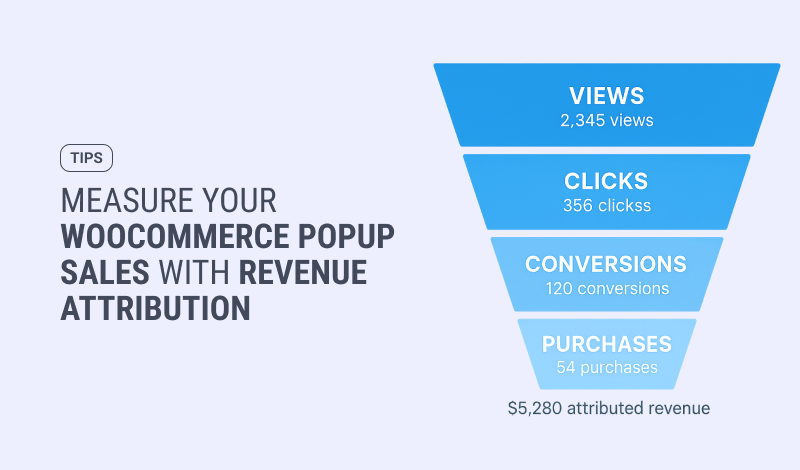
WooCommerce revenue attribution tells you exactly how much money each on-site campaign earned, so you can stop guessing which offers actually drive sales. FireBox ties completed WooCommerce orders back to the campaign that influenced them, crediting both the shoppers who saw an offer and the ones who clicked or submitted it (on the Pro and Growth plans). Views and clicks tell you a campaign got attention; attribution tells you it made money, which is the only number that decides what to keep.
This is the measurement layer underneath every other play in our guide on how to increase WooCommerce sales. Recover the cart, raise its value, capture the email: attribution is how you prove each one paid off.

- The problem: views and clicks are not revenue
- Why Google Analytics and UTMs fall short
- How WooCommerce revenue attribution works
- Reading the report: a worked example
- Target the right shoppers so there is revenue to measure
- Conclusion
- FAQ
- What is WooCommerce revenue attribution?
- What is the difference between view-through and conversion-through revenue?
- Does attribution count test or canceled orders?
- Which FireBox plan includes revenue attribution?
- Can I A/B test campaigns to find the best one?
- Can I track popup revenue in Google Analytics?
- What is a view-through conversion?
The problem: views and clicks are not revenue
Most stores can see how many people viewed a campaign or clicked it, but not whether that specific campaign made anyone buy. A popup that says "Buy 2, get 1 free" might rack up impressions and still sell nothing, while a quiet free-shipping bar drives real orders. Without a way to connect campaigns to completed orders, you end up:
- pouring time into campaigns that look busy but do not sell,
- missing the quiet winners that deserve to run in more places, and
- deciding what to build next on a hunch instead of a number.
Attribution removes the guesswork by answering one question per campaign: how much revenue did this actually earn?
Stop guessing which campaigns earn FireBox attributes real WooCommerce orders back to the campaign that drove them, so you scale what works and cut what does not.Why Google Analytics and UTMs fall short
Most stores reach for Google Analytics 4 and UTM tags first, then hit a wall. GA4 is built to track where traffic comes from and what happens on a page, not to tie a specific on-site campaign to the revenue of a completed WooCommerce order. You can fire an event when a campaign is viewed or clicked, but connecting that event to the exact order total, crediting a shopper who saw the offer and bought two days later, and seeing it broken out per campaign usually means a custom event setup, disciplined UTM tagging, and reconciling GA's figures against WooCommerce's own order reports. Even then, GA4's attribution settings default to last-click, which tends to hand credit to the final channel and bury the on-site offer that actually influenced the sale.
WooCommerce revenue attribution closes that gap natively. Because FireBox runs the campaign and reads your WooCommerce orders directly, it attributes real order revenue to the campaign that earned it, with both view-through and conversion-through credit (a multi-touch view), and no tagging project to maintain. GA4 still answers "where did my traffic come from"; attribution answers "which of my on-site offers made money."
How WooCommerce revenue attribution works
FireBox follows each shopper's path from the moment they see a campaign to the order they complete, and credits revenue two ways:
- View-through revenue. A shopper sees an offer, does not act on it right away, then comes back later and buys. FireBox records that the campaign was seen and influenced the purchase, even without a click.
- Conversion-through revenue. A shopper clicks a tracked button or submits a FireBox form, then completes a purchase. FireBox credits that order to the campaign directly.
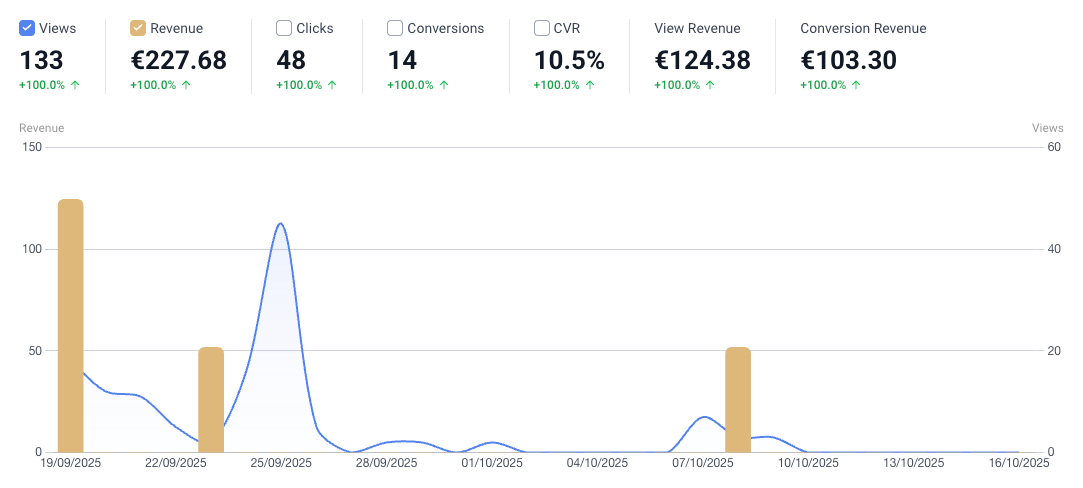
It is worth being precise about view-through: it credits a campaign a shopper saw before buying, which is influence, not proof the campaign was the only reason for the sale. That is deliberate. Most analytics swing the other way and hand all the credit to the final click, which quietly buries the offers that plant the seed days earlier. Counting both gives you a fairer read. The tracking also only counts real, completed orders and ignores test and canceled ones, so the numbers reflect money you actually banked. For the concept on its own, our explainer on revenue attribution for WordPress popups breaks it down from first principles.
What you see in your FireBox reports
Attribution lives inside the same reports where you already track views and conversions, with revenue added alongside. At a glance you can see:
- Revenue over time: how much your campaigns earned last week or last month.
- Top-performing campaigns: which offers drive the most completed orders, not just the most clicks.
- Where shoppers drop off: where people see an offer but do not buy, so you know which step to fix.
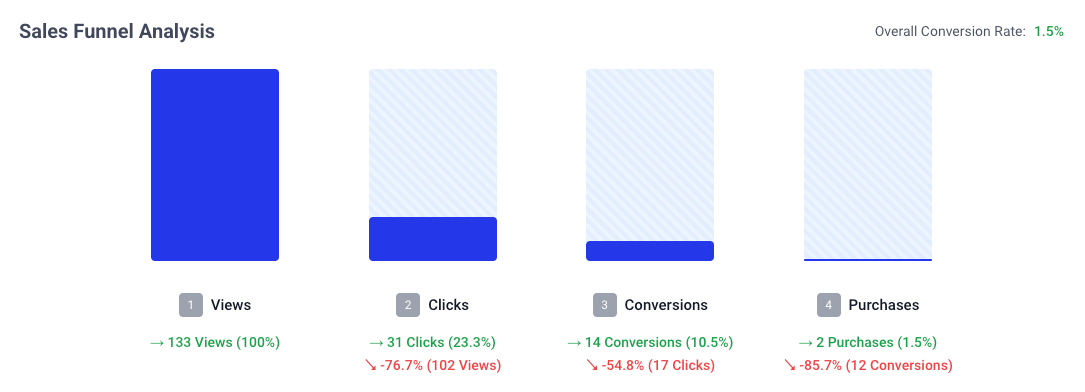
That funnel view is the difference between knowing a campaign got plenty of views and knowing whether those views turned into revenue, and where the ones that did not slipped away.
Reading the report: a worked example
Numbers make this concrete. Picture two campaigns over a month (illustrative figures, yours will differ):
- Campaign A, a site-wide 10% discount popup: 4,000 views, plenty of clicks, and $600 in attributed revenue.
- Campaign B, a free-shipping bar on the cart page: 900 views, fewer clicks, and $3,200 in attributed revenue.
On a views-and-clicks dashboard, Campaign A looks like the clear winner. Attribution flips the picture: Campaign B earns more than five times the revenue from a quarter of the views, because it reaches shoppers at the moment they are deciding rather than interrupting everyone. The decision writes itself. Give B more room (more pages, a higher budget, a second variant to test) and rework or retire A. Without the revenue column, most stores would have scaled the wrong campaign and called it a win.
How to act on the numbers
The report is only useful if it changes what you do next. A simple loop:
- Scale the winners. When a campaign earns well, run it in more places or extend it to similar shoppers.
- Fix or cut the losers. If a campaign draws views but little revenue, change the offer or retire it.
- Compare two versions honestly. FireBox has no one-click split-test engine; you A/B test by duplicating a campaign, changing one thing, and comparing the attributed revenue of each. Our guide on A/B testing WordPress popups walks through that manual workflow.
- Spend where it pays. Point your time and budget at the offers attribution proves are earning.
This is also how agencies prove their value: a per-client revenue report showing exactly what the on-site campaigns earned that month.
See which campaigns actually pay off FireBox shows the revenue behind every campaign, so your next decision is backed by a number, not a hunch.Target the right shoppers so there is revenue to measure
Attribution measures the result; targeting creates it. The more relevant a campaign, the more revenue there is to attribute, so the two work together. FireBox can trigger campaigns on your store's own data, like cart value, cart contents, the product on screen, and a logged-in customer's purchase history, through its WooCommerce display conditions, and personalize the message with WooCommerce smart tags such as the live cart total. For the playbook on putting those to work, see personalized WooCommerce popups, increasing average order value, and reducing cart abandonment. One caveat: purchase-history and total-spend targeting work for logged-in or known customers only.
Run those targeted campaigns, then let attribution tell you which ones earned, including the repeat-purchase offers behind customer lifetime value. If you are still choosing a tool, our roundup of the best WooCommerce sales popup plugins weighs which ones can actually prove revenue.
Put targeting and proof together FireBox combines WooCommerce targeting with revenue attribution, so you run offers on real data and see exactly what each one earned.Conclusion
For a WooCommerce store, knowing which campaigns make money is the difference between scaling on evidence and guessing in the dark. WooCommerce revenue attribution ties completed orders back to the campaigns that influenced them, with both view-through and conversion-through credit, and ignores test and canceled orders so the numbers are real. Target shoppers with your store's own data, run the offers, then read the revenue report and double down on what works. That loop, run every month, is how a store grows on proof instead of hope.
FAQ
What is WooCommerce revenue attribution?
It is the practice of tying completed WooCommerce orders back to the on-site campaign that influenced them. FireBox does this automatically on the Pro and Growth plans, crediting both shoppers who saw an offer and those who clicked or submitted it, so you can see the real revenue each campaign earned.
What is the difference between view-through and conversion-through revenue?
View-through credits a campaign a shopper saw but did not click before buying later. Conversion-through credits a campaign the shopper actively clicked or submitted before purchasing. Tracking both shows a campaign's full influence, rather than only rewarding the last click.
Does attribution count test or canceled orders?
No. FireBox only attributes real, completed orders and ignores test and canceled ones, so the revenue you see reflects money you actually kept. That keeps the per-campaign numbers trustworthy enough to make budget decisions on.
Which FireBox plan includes revenue attribution?
WooCommerce revenue attribution is available on the Pro and Growth plans. The free version tracks views and conversions, while attribution adds the revenue layer that connects those campaigns to completed orders.
Can I A/B test campaigns to find the best one?
Yes, with a manual workflow. FireBox has no one-click split-test engine, so you duplicate a campaign, change a single element, run both, and compare their attributed revenue to see which performs. It is a straightforward, honest way to test without a separate tool.
Can I track popup revenue in Google Analytics?
Not easily. GA4 can record campaign view and click events, but tying them to the revenue of specific completed WooCommerce orders, including shoppers who saw an offer and bought later, takes custom event tagging and ongoing UTM upkeep. FireBox attributes real order revenue to each campaign natively, with no tagging project to maintain.
What is a view-through conversion?
A view-through conversion is a sale from a shopper who saw your campaign but did not click it, then purchased later. It captures the influence of an offer that planted the idea even without a direct click, which last-click tracking misses entirely. FireBox credits these alongside direct click conversions.
Get FireBox for Free
Enter your WordPress website URL to install instantly.
Trusted by 9,000+ users

0 Comments