

Prevent Campaigns From Appearing on UTM Traffic
When running marketing campaigns, you may want to avoid showing certain FireBox campaigns to visitors coming from specific UTM links.
For example:
- Visitors coming from a paid ad
- Visitors arriving from a newsletter campaign
- Traffic from affiliate promotions
In these cases, showing additional on-site campaigns could interfere with the intended landing experience.
With FireBox, you can prevent this by using the URL Display Condition to detect UTM parameters in the page URL.
Example Scenario
Suppose you are running a Facebook Ads campaign using the following landing URL:
https://example.com/?utm_campaign=facebookYou may want to prevent certain campaigns from appearing for these visitors because:
- The landing page already includes the promotion
- The campaign message would be redundant
- You want a cleaner landing experience for paid traffic
You can exclude these visitors by targeting the UTM parameter in the URL.
How to Exclude UTM Campaigns
Follow these steps to prevent a campaign from appearing when specific UTM parameters are present.
- Go to FireBox -> Campaigns
- Edit your campaign
- Open the Display Conditions panel
- Click on "Set Custom Rules"
- Select the URL Condition and set it up as below:
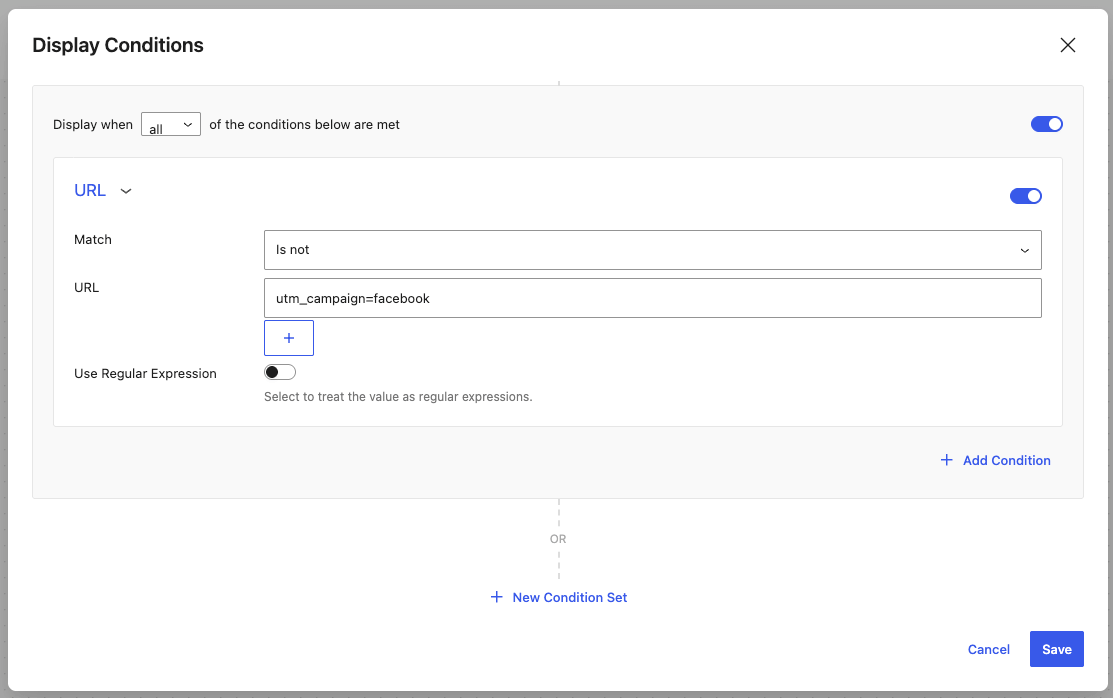
| Option | Value |
|---|---|
| Match | Is not |
| URL | utm_campaign=facebook |
This configuration tells FireBox:
Do not display this campaign when the URL contains
utm_campaign=facebook.
Save your campaign settings.
Examples of UTM Rules
You can exclude campaigns based on different UTM parameters.
Exclude Facebook Traffic
utm_source=facebookExclude Email Campaign Visitors
utm_source=newsletterExclude a Specific Promotion
utm_campaign=black_friday