

FireBox Campaign Settings Missing? Disable the Classic Editor Plugin
When you open a FireBox campaign with the Classic Editor plugin active, the campaign loads in the classic editor page with none of the campaign configuration settings, along with this message:
FireBox is a Gutenberg-based plugin and in order to edit a campaign, you must have the Classic Editor plugin disabled.
FireBox does not support the Classic Editor. FireBox campaigns are built with the WordPress block editor (Gutenberg), so the campaign settings only appear there, and not in the classic editor.
You don't have to remove the Classic Editor plugin. You can keep it for your posts and pages and still edit FireBox campaigns with the block editor. This guide shows you how in two steps.
Why are the campaign settings missing?
When the Classic Editor plugin replaces the block editor site-wide, WordPress opens every post type — including FireBox campaigns — in the classic editor. Instead of the FireBox campaign editor, you see a plain post editing screen with no campaign blocks, design controls, or campaign settings.
The FireBox campaign editor requires the block editor. The good news: the Classic Editor plugin lets both editors coexist.
How to edit FireBox campaigns while keeping the Classic Editor
Step 1: Allow switching between editors
- In your WordPress dashboard, go to Settings → Writing.
- Set Allow users to switch editors to Yes.
- Click Save Changes.
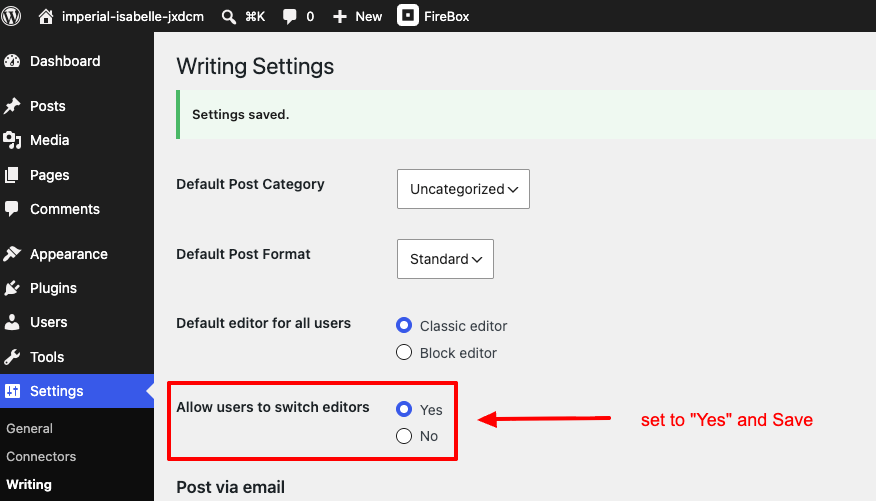
Your posts and pages continue to open in the Classic Editor as before. This setting only adds the option to open individual content items, such as FireBox campaigns, in the block editor.
Step 2: Switch your campaign to the block editor
- Go to FireBox → Campaigns and click Edit on your campaign.
- If the campaign opens in the classic editor, click Switch to block editor in the right-hand sidebar.
- The campaign now opens in the FireBox campaign editor, where you can design and configure it as usual.
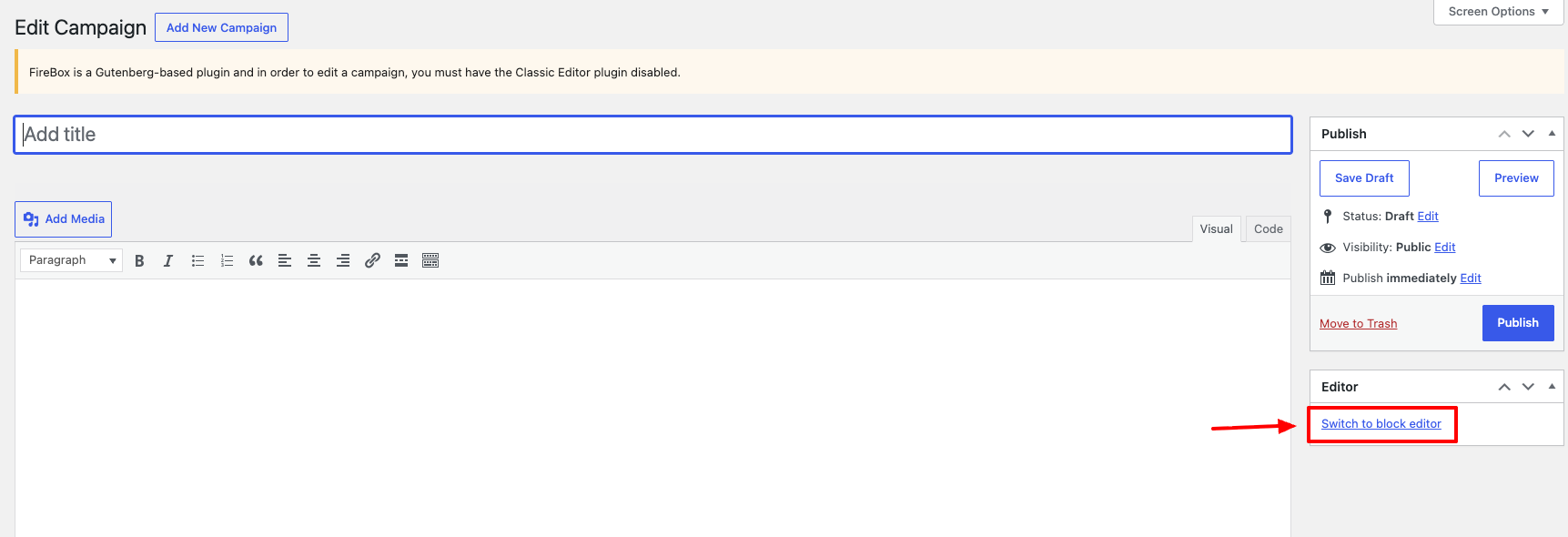
WordPress remembers the last editor used per post, so after switching once, the campaign keeps opening in the block editor.
Alternative: Deactivate the Classic Editor plugin
If you don't need the classic editor on your site, deactivate the Classic Editor plugin under Plugins → Installed Plugins. All FireBox campaigns will then open directly in the FireBox campaign editor.
Frequently asked questions
Does FireBox work with the Classic Editor plugin installed?
Yes. FireBox works on sites that have the Classic Editor plugin installed, as long as campaigns are edited with the block editor. Enable "Allow users to switch editors" in Settings → Writing and switch campaigns to the block editor.
Can I build FireBox campaigns in the Classic Editor?
No. The FireBox campaign editor is built on the WordPress block editor (Gutenberg) and requires it. The Classic Editor cannot render campaign blocks, design options, or campaign settings.
Will enabling "Allow users to switch editors" change how my posts and pages open?
No. Your existing posts and pages continue to open in the Classic Editor by default. The setting only adds the option to switch a specific post to the block editor.
Do my campaigns still display on the frontend if the Classic Editor is active?
Yes. The Classic Editor plugin only affects the admin editing screen. Published campaigns display normally on your site regardless of which editor plugin is active.